Showing posts with label huawei. Show all posts

How to free up space with storage tools in Android 7.1

Squeezing out enough storage space is one of the ever-present struggles of smartphone life. Android 7.1 brings some integrated tools to handle this all in one spot. To check out what’s here, go to Settings > Storage.As with previous versions of Android, you’ll see a breakdown of storage used by category.


However, check out a new tool by selecting Manage Storage at the top of the list. You’ll see an option for Smart Storage, which when toggled on will automatically remove backed up photos and videos when your phone's storage is almost full. If you have a Pixel (the first phone with Android 7.1), you get free storage at full resolution. 


Then, if you select Free up now you get more specific options for removing items. Since these items look for apps or photos that haven't been used in a long time, you may not see a ton of suggestions right away, especially if you have a new Pixel or just reset your device with Android 7.1
Finally, you can get more specific details about which apps and other elements of your phone are the main storage culprits. 


From the shared storage menu you can touch on any of the categories, like apps, images, or videos. This will let you know what’s using up the most room.
Also, touch the overflow menu and go directly to Free up space if you know you want to start right away on some purging.
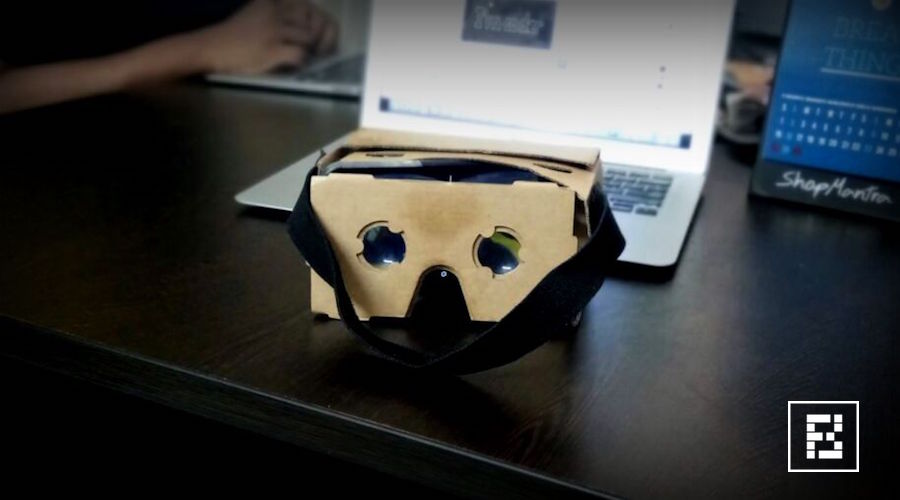
How To Check If Your Smartphone Is VR Compatible?


There are a few requirements your smartphone has to satisfy in order to support VR content. It requires the gyroscope, magnetometer, and accelerometer sensors to bring the virtual reality in front of you. Here are a few methods which can help you know whether your smartphone is VR compatible or not.

here are a lot of VR headsets out there. The Oculus Gear VR, Google Daydream, HTC Vive, or the minimalistic Google Cardboard. These are the popular ones but you can find a of number VR headsets on e-commerce websites in different price segments.

There is one thing that many people including me are curious about. Is my smartphone VR compatible? Many of us don’t have much idea about how these futuristic helmet work with our smartphone. The feature videos from their makers mostly show a smartphone sliding inside headset and one enters the world of virtual reality. So, in this article, there are a few methods which you can use to check if your smartphone is compatible with VR headsets or not.

What are the requirements?

For your smartphone to be VR compatible, your device should have the following sensors:

Gyroscope & Accelerometer

The task of the accelerometer sensor is to detect the linear orientation of your smartphone. For instance, when you move your smartphone from portrait to landscape mode the screen rotates because the accelerometer sensor comes at work.
The Gyroscope sensor is used to check the tilt or twist movements of your smartphone. For example, if you place your phone on a table and rotate it horizontally then it’s the gyro sensor which detects the change in its orientation. The accelerometer sensor can’t do this, it can only detect linear changes in the orientation.
The gyro sensor is a must for your smartphone to be compatible with a VR headset. The accelerometer sensor is generally available in almost all the smartphones out there.

Magnetometer

This is also known as compass sensor. It is used to know the direction of the phone with respect to earth’s magnetic field. It helps your phone decide which direction is North.

Method 1: Use VR-checking apps on Play Store

There are a bunch of apps available on the Google Play Store which can help you get the answer for the question — Does my smartphone support VR?
These apps check whether your smartphone has the gyroscope and magnetometer sensors. You can try these apps on Google Play store to check whether your smartphone supports VR.

EZE VR


With a single tap, this app can detect whether your smartphone has the required sensors. You need to tap Check and it will be a matter of seconds for the EZE VR to tell if your device supports VR.

VR Checker


Unlike, EZE VR, the VR Checker doesn’t require even a single tap. It is able to tell whether your smartphone is VR compatible, displays other information like device name, screen resolution, screen size, etc. It tells you whether your device is Optimum, Compatible, or Incompatible for VR headsets.

Method 2: Using the YouTube app

The app tells you that you can use your smartphone to watch VR content. There is a simple method you can try.
  1. Update the YouTube app on your smartphone to the latest version.
  2. In your YouTube app, open a 360-degree video. You can also go to the 360-degree videos channel to find some amazing content.
  3. Go full-screen and put your phone in landscape mode.
  4. Tap the button shaped like Google Cardboard logo.
  5. Your screen will divide into two parts showing the same video.
  6. Try to tilt and rotate your smartphone and check if the video also rotates. If it does, then congrats, your smartphone can play VR.
Important: Without the gyro sensor, you will be abe to play the 360-degree videos but you won’t be able to move in the video.

Method 3: Google Cardboard App

Huawei Mate 9 to Come With Dual-Camera Setup and Powerful Battery


Huawei is working on an exciting new smartphone, the Mate 9. Rumors on the upcoming smartphone continue to surface online, the latest regard the dual-camera setup on the smartphone and the battery capacity.


A leakster on Weibo revealed that the phone might be coming with 20MP and 12MP rear cameras manufactured by Leica. This is not the first smartphone that Huawei equipped with Leica dual-camera setup, Huawei P9 also came with rear cameras manufactured by the German optics company.
The leak spotted by MySmartPrice also shows that the battery capacity could reach 3,000mAh with a SuperCharge feature that would allow the phone to charge to 50% capacity in just five minutes. This means that the smartphone could potentially be charged to 100% in just a few minutes.
Huawei Mate 9 might incorporate the latest Kirin 960 chipset
Other rumors regarding the smartphone show that the Mate 9 might come with a 5.9-inch display with 1080 x 1920 pixel resolution and an 8MP front camera for snapping selfies and conducting video calls. The smartphone might also come with an octa-core Kirin 960 chipset, which could be announced later this month. The chipset uses the 16nm process and might contain Cortex-A73 cores.
In addition, the Mate 9 might be offered in three variants, depending on RAM capacity and internal storage. One variant will come with 4GB of RAM and 64GB of internal storage and it will carry a price tag of about $480. The second version might have 4GB of RAM and 128GB of local storage with a price tag $585. The premium model will have 6GB of RAM and 256GB of internal memory for the price of $705.
Of course, these specs aren’t final until the company actually announces the smartphone, which might happen on November 3. A recent report showed that the company started sending invites for an event scheduled on that day, although the name Mate 9 isn’t specified on the invite.